
Data Analysis and Troubleshooting Guide
720 Olive Dr Ste E
Davis CA, 95616
(530) 220-7668
Contents
- Introduction to troubleshooting
What typical data should look like (2 days of SWP)
What typical data should look like (2 weeks of SWP)
What typical data should look like (2 months of SWP)
What typical data should look like (1 year of SWP)
Comparisons against the pressure chamber - How to use the data for irrigation
Irrigating with FloraPulse data in crops that have established SWP guidelines: almond, apple, prune, walnut, winegrapes
Irrigating with FloraPulse data in crops that lack SWP guidelines - Sensor problems
Sensor suddenly goes to zero and stays there. Cavitation.
Sensor dries out over time, unreasonably low SWP
Sensor diurnal SWP fluctuations shrink. Difference between highest and lowest daily SWP become too small.
Sensor slowly goes to zero and stays there. Flooded.
Sensor goes to zero right after a rain event. Waterlogged insulation causes sensor to read too wet.
Unrealistically dry readings during the hottest parts of the day, or quick drops in SWP during temperature increases (i.e. 10am). Psychometric.
Sensor reads positive values over 1 bar
The lowest SWP for the day is delayed and happens at nighttime (i.e. 2 am)
Random upward spikes/noise
SWP data suddenly jumps to unrealistic value, or shows big 5+ bar amounts of noise. Sensor breaks.
Over-winter behavior
Slightly positive SWP values
Below zero temperatures
If desired: test the sensor function in the laboratory! - Data-gathering problems
Data is choppy or completely missing (FloraPulse Datalogger)
Data shows ‘NaN’ (SDI12 interface)
Introduction to troubleshooting
What typical data should look like (2 days of SWP)
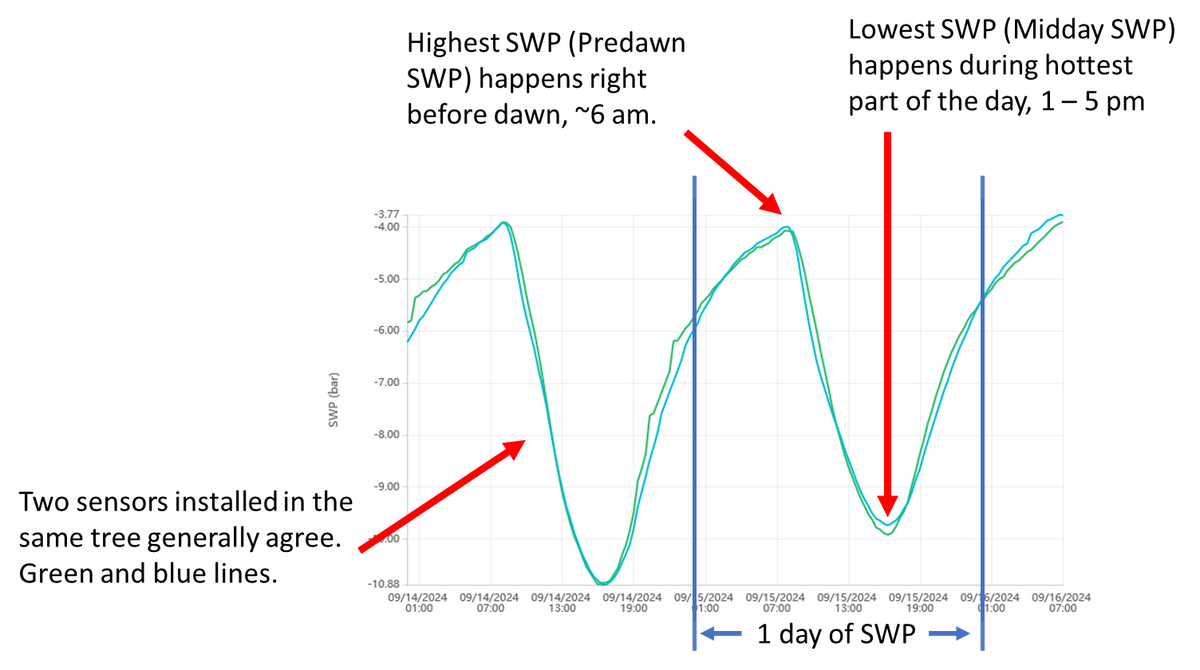
Typical day, typical sensors:
- Sensor recovers overnight to the highest SWP right before dawn (predawn SWP), then begins drying out to reach lowest SWP during the hottest part of the day (midday SWP), and finally begins recovering again as temperatures drop.
- Two sensors installed in the same tree read similar values. Some difference is normal.
What typical data should look like (2 weeks of SWP)
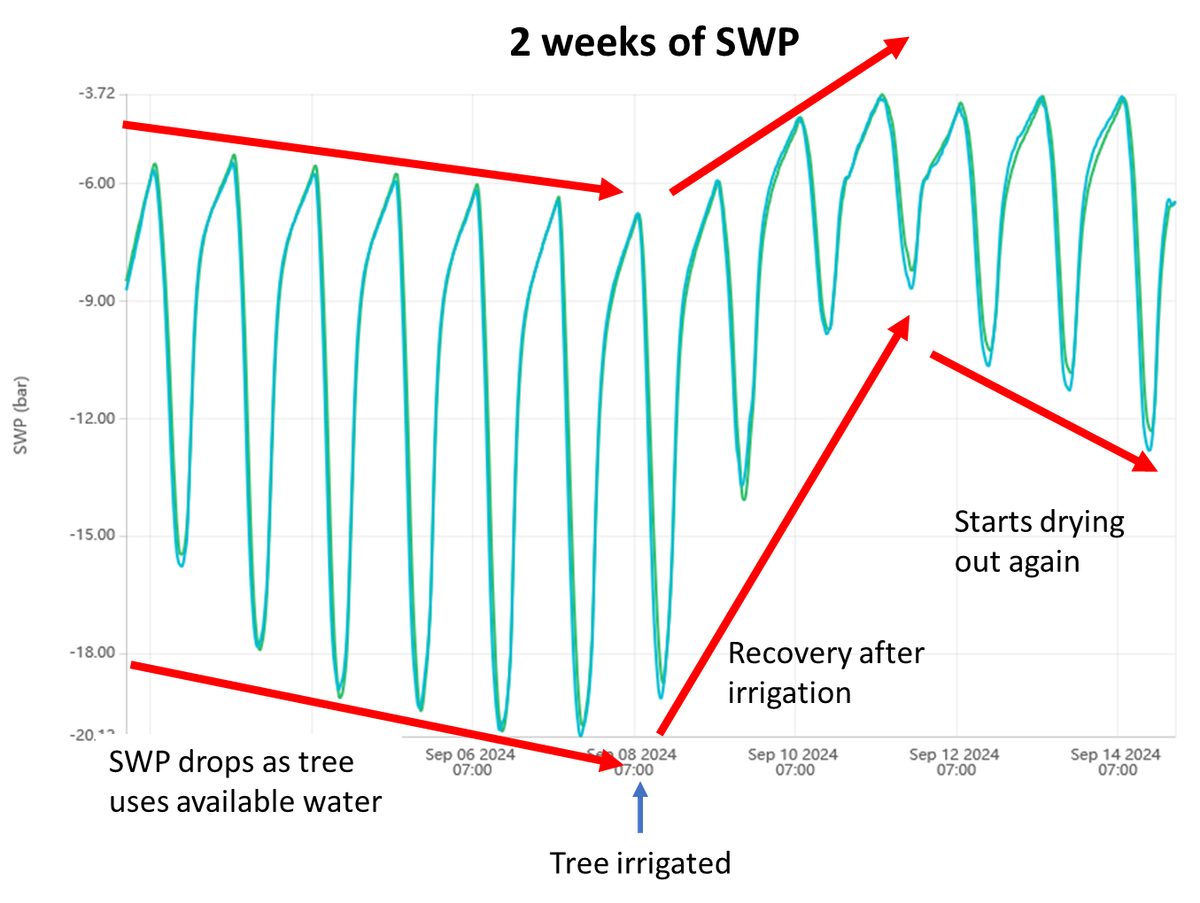
Typical week, typical sensors:
- Over the course of days, the microtensiometer sensors will show trends in SWP as (1) the tree uses the water in the soil and the measured SWP drops; and (2) the tree is irrigated and measured SWP increases as the tree recovers. This drying and recovery cycle is normal and desired, as it’s important to wait until the tree gets somewhat stressed before irrigation.
- During drying, the midday SWP usually drops substantially, but the predawn SWP will only drop slightly. The pattern is similar during recovery.
What typical data should look like (2 months of SWP)
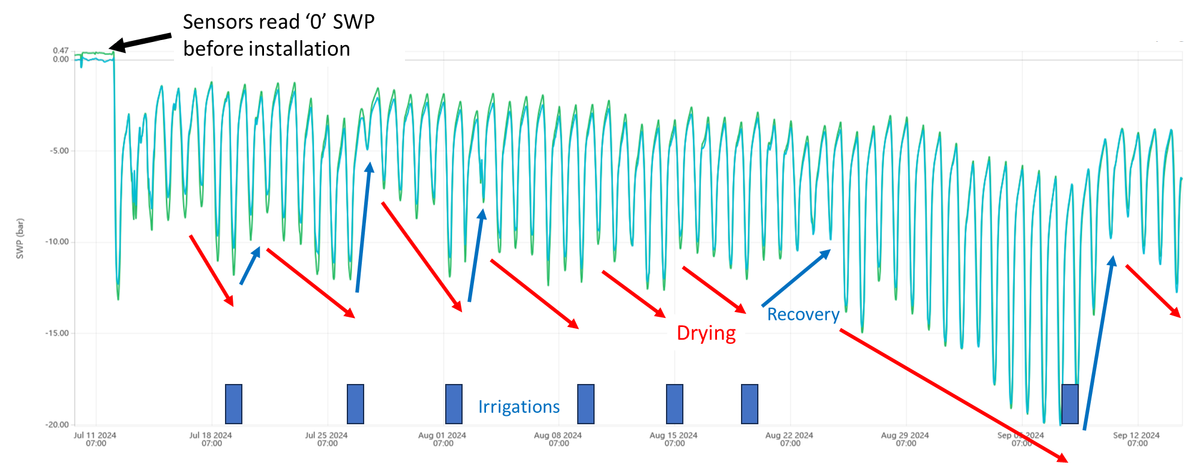
Typical month, typical sensors:
- Over the course of months, you should see a longer-term pattern of drying and recovery. There should be a clear recovery trend after an irrigation.
- Recovery can sometimes happen in a day, but other times it can take a week.
- Notice that sensors will read zero when in water before installation.
What typical data should look like (1 year of SWP)
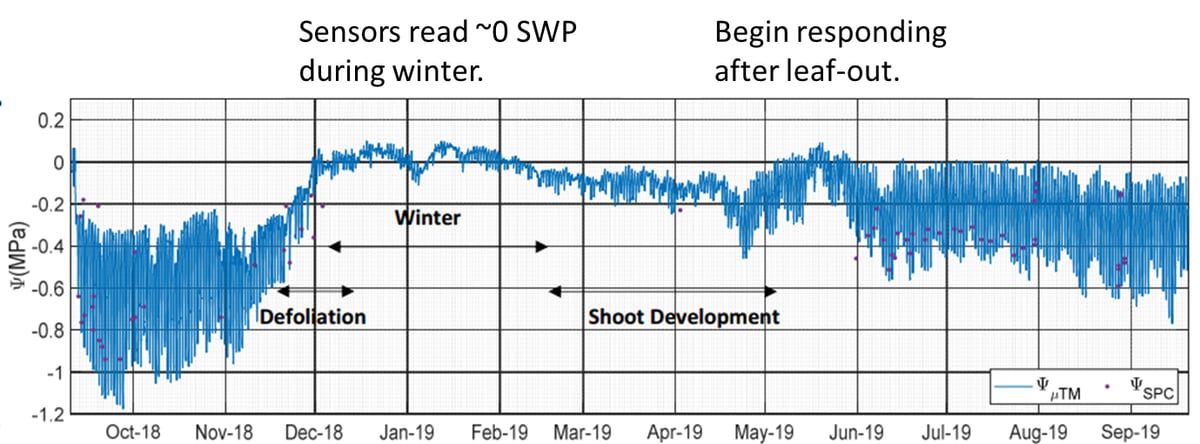
Typical year, typical sensors:
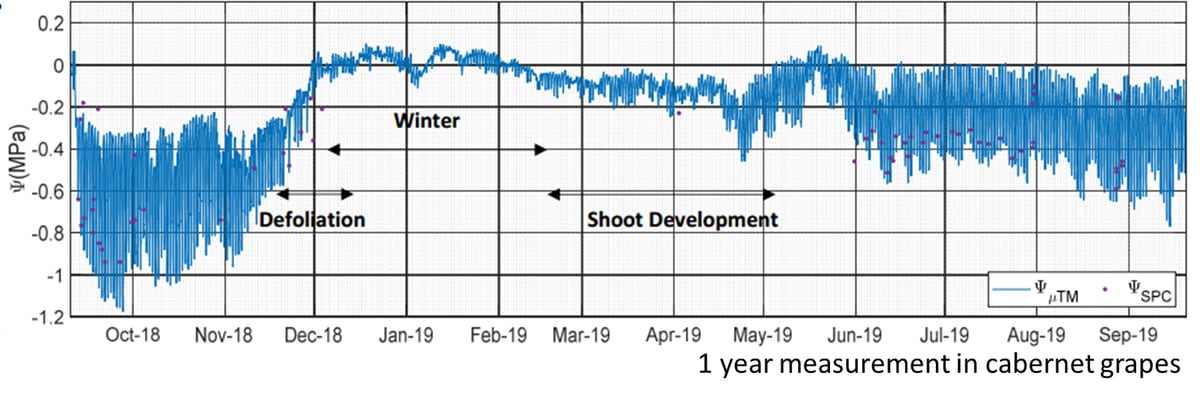
- Over the course of a year, the tree will go through various phases and the sensor responds accordingly.
- During the winter, the tree loses its leaves and stops transpiring – at this stage the sensors will generally read zero SWP, or slightly positive.
- During spring, the leaves come out and the sensor will begin showing a clear diurnal SWP pattern of drying and recovery.
- During the summer, the days are hotter and the trees are generally under higher stress; the measured midday SWP for this season are usually lower (more negative).
- In some crops, the sensor installation wound tends to close during the winter, which prevents accurate measurement. We generally recommend that sensors be removed and re-installed in the spring after leaf-out for maximum accuracy.
Comparisons against the pressure chamber
Typical sensor in typical crop:
- Sensors accurately measure water potential wherever they are installed. The sensors, by themselves, have a response time of under 15 minutes.
- When installed into a tree, the sensor response time can be on the order of 1-3 hrs., depending on the quality of the hydraulic sensor-tree connection. A better hydraulic connection (i.e. more water channels connecting the sensor to the tree), translates to a faster response.
- The sensor response time usually slows down somewhat over the course of months, as water channels in the mating compound cavitate, and the tree xylem vessels near the wound site gum up with exudates or cavitate.
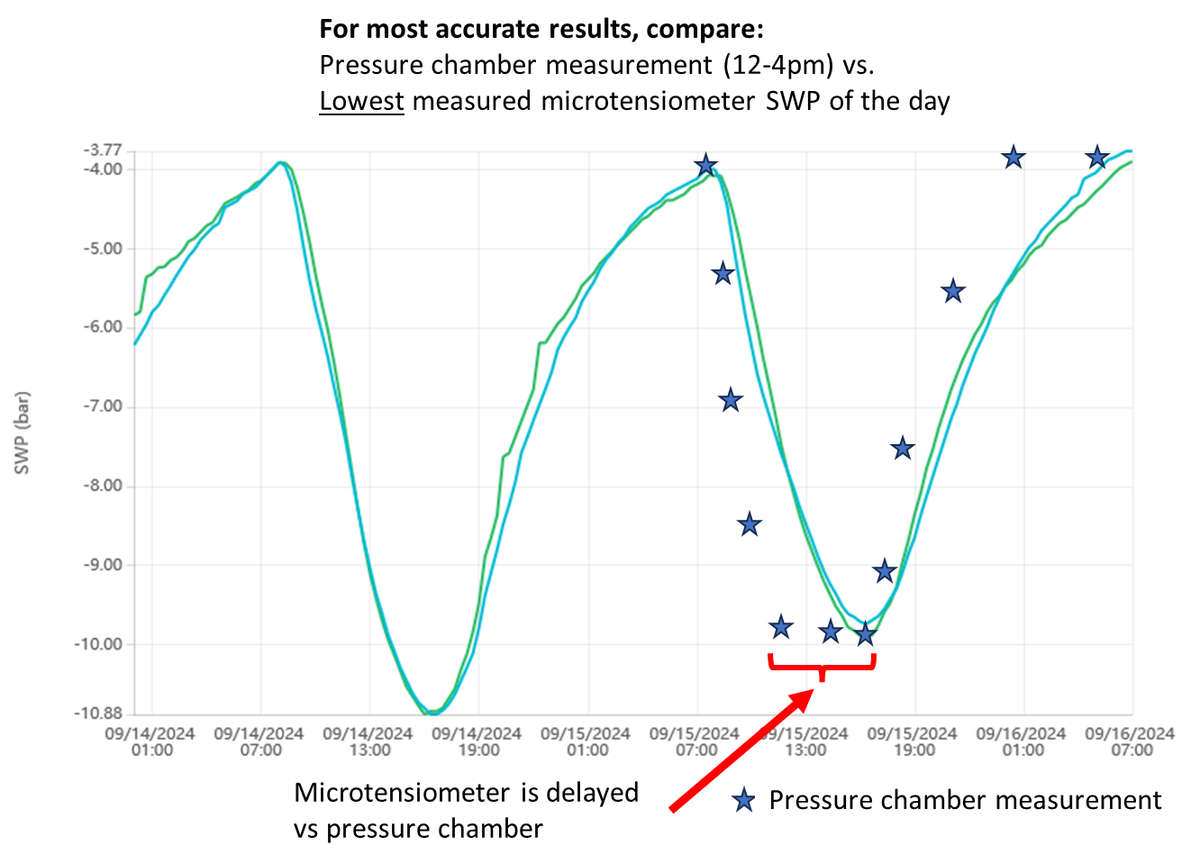
- The upshot: the microtensiometer measured SWP usually lags the tree SWP by 1-3 hours. In practice, this means that the tree will reach the lowest SWP (midday SWP) at, say, at 12:00, but the sensor will read the same midday SWP only 3 hours later at 3:00 pm.
- Because the tree SWP usually stays at its minimum value for ~4 hours every day, the delayed response of the sensor is not an issue.
- When comparing against the pressure chamber – compare the measured pressure chamber SWP (12-4pm) versus the microtensiometer’s lowest measured SWP for the day. This lowest value is called the midday SWP.
How to use the data for irrigation
Irrigating with FloraPulse data in crops that have established SWP guidelines: almond, apple, prune, walnut, winegrapes
The advantage of FloraPulse data is that our microtensiometer probes measure the same information (stem water potential) as the Schölander pressure chamber. But without the manual hassle. This makes data interpretation easier and more accurate – you can use the pressure chamber guidelines that have been developed by scientists over the last 30+ years.
Refer to our crop validation database for links to established guidelines for various crops.
Using midday SWP for irrigation
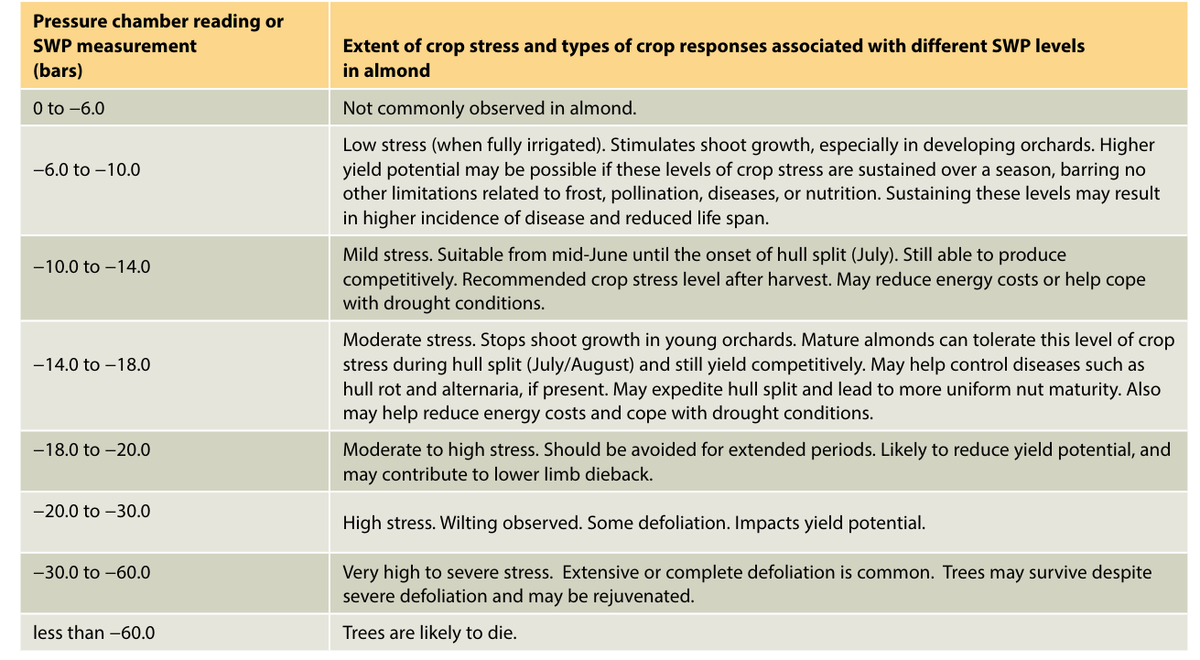
- The straightforward way to manage irrigation is by using the midday SWP thresholds given for your crop. For instance, almonds should be kept between -6 to -14 bars of midday SWP during the spring (more negative values like -14 mean more stress or a drier tree).
- Since FloraPulse gives continuous SWP, we take the lowest SWP value for each day as the midday SWP. Read the section ‘Comparisons against the pressure chamber’ for details.
- Then, you basically irrigate when you get below your desired SWP range. In the almond case, you may wait until the tree midday SWP reads -14 bars, then irrigate. The tree will recover to, say, -6 bars midday SWP, then begin to decrease to -7, -9, etc. over the course of days until it reaches -14 bars and it’s time to irrigate again.
- A more accurate, but more complex method to irrigate involves calculating the baseline midday SWP and irrigating by looking at bars below baseline. More details here.
Using 24/7 SWP for irrigation
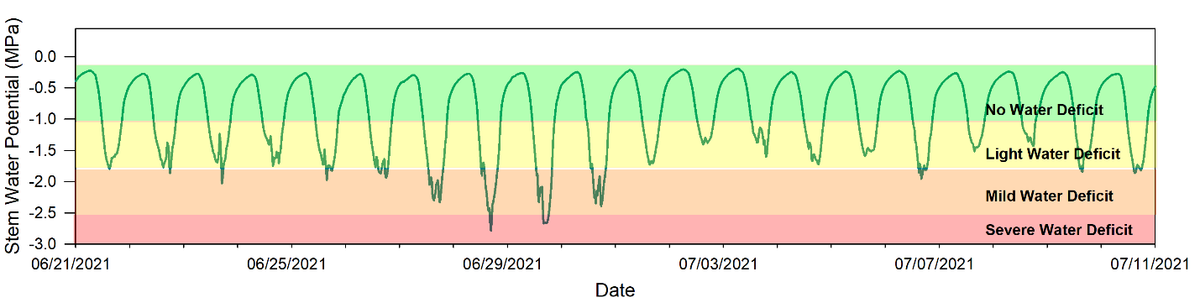
- You may also use the continuous 24/7 SWP data to make your irrigation decisions. The idea is similar to irrigating with the midday SWP. You look at the lowest point each day and compare that against your irrigation threshold. If the lowest SWP for the day is below your desired stress level, then you irrigate. See the figure below – the grower irrigated when the tree showed a ‘severe water deficit’ stress level on 6/29, the tree recovered by 7/2, then began dropping again right after.
- This excellent article explains how to use 24/7 SWP data for irrigating apples.
Irrigating with FloraPulse data in crops that lack SWP guidelines
FloraPulse sensors accurately measure SWP in a majority of crops, but unfortunately stress level guidelines are often incomplete or lacking for many crops. Our sensors can still provide invaluable data for making irrigation decisions, but you’ll need to use common sense and look at the trend of measured SWP, instead of the absolute values.
Step 1: observe measured SWP trend for your typical irrigation regime
- Measured SWP should show the following pattern: the lowest SWP value for each day should decrease post-irrigation, for a few days, then recover after irrigation (see: What typical data should look like (2 weeks of SWP)). You want to see this see-saw pattern – it means that you are waiting enough between irrigations for the tree to use the water you gave it, and only then irrigating again.
Step 2: Tweak your irrigation schedule (timing) according to what you are seeing.
- The tree midday SWP changes very little or not at all. If the measured SWP changes little from day to day (i.e. all the days look about the same), this could indicate that you are irrigating too frequently and not giving the tree enough time to use the water given. Try increasing the time between irrigations.
- The tree midday SWP crashes to a very negative value. If the measured SWP is dropping to very negative values, it may indicate that you are waiting too long between irrigations and should consider irrigating more frequently. You will need to do your own observations to determine how much stress is too negative for that particular crop. Obvious signs to look for are drooping leaves, but by the time stress is visible, it’s often too late!
Step 3: Tweak your irrigation amounts (if desired)
- Most growers will have a calculated irrigation amount that is based on the soil type and tree rooting depth. This could be, for instance, 6-hour irrigation sets, or 3 gallons per tree, depending on how you calculate irrigation. FloraPulse does not directly recommend irrigation amounts, but looking at the SWP pattern pre- and post-irrigation could give clues to tweak the irrigation quantity. For instance, you could slowly decrease the irrigation amounts applied and see how that affects the time it takes for the tree to reach the threshold SWP for irrigation (i.e. it’s dry enough to irrigate again).
- You may also use FloraPulse with soil moisture sensors to better tweak your irrigation amounts. When measuring soil moisture, you want to irrigate until water reaches the bottom of the tree roots, but no further.
Sensor problems
Sensor suddenly goes to zero and stays there. Cavitation.
Problem:
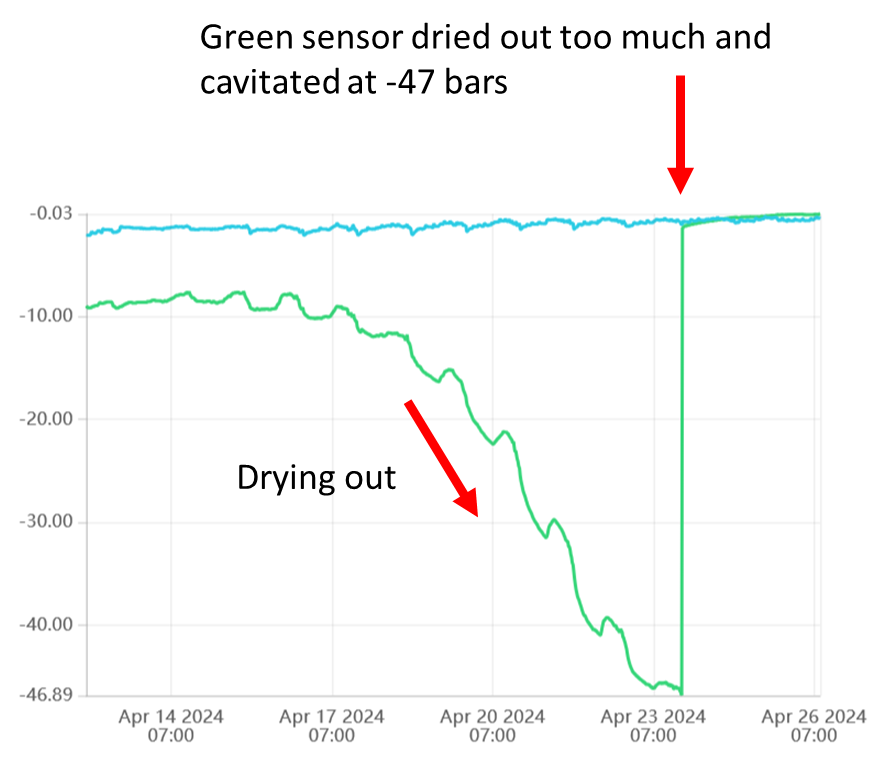
- Sensor dried out to below -35 bars, then suddenly jumped to zero and is stuck at zero.
Cause:
- The sensor cavitated. Cavitation happens when the WP drops too low and the sensor membrane cannot hold the tension. The water inside the probe ‘breaks’ and the sensor will suddenly read zero.
- All sensors are tested during manufacture to ensure they will not cavitate above (wetter than) -35 bars.
- A sensor can also cavitate above (wetter) than -35 bars due to a defect in the membrane (the membrane broke).
Solution:
- Refilling the sensor may bring it back to life. If plan to refill, keep sensor wet in the meantime. Our distributor Lab-Ferrer in Spain offers refilling services to his clients.
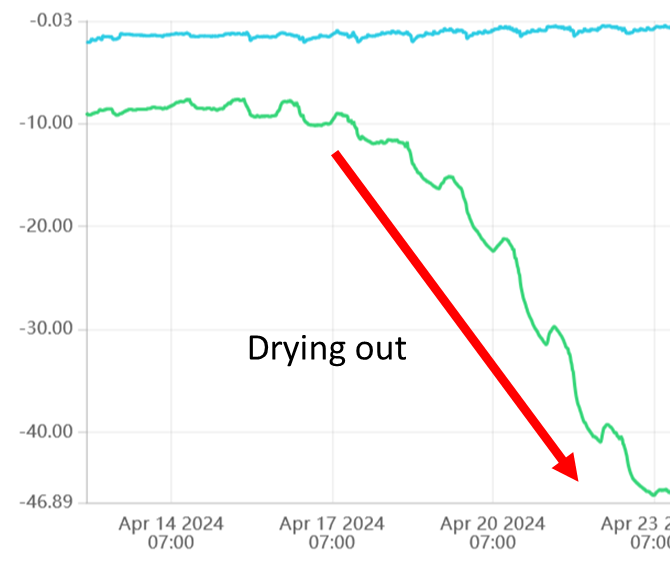
Sensor dries out over time, unreasonably low SWP
Problem:
- Measured SWP slowly drops over the course of days to values that are too dry. Both predawn and midday SWP are too low.
Cause:
- The sensor installation site is drying out. This is likely due to a water vapor leak from somewhere in the installation site. The water seal is faulty.
Solution:
- Try adding more sealant around the sensor sleeve to block any leaks.
- Try removing and reinstalling the sensor in a new spot.
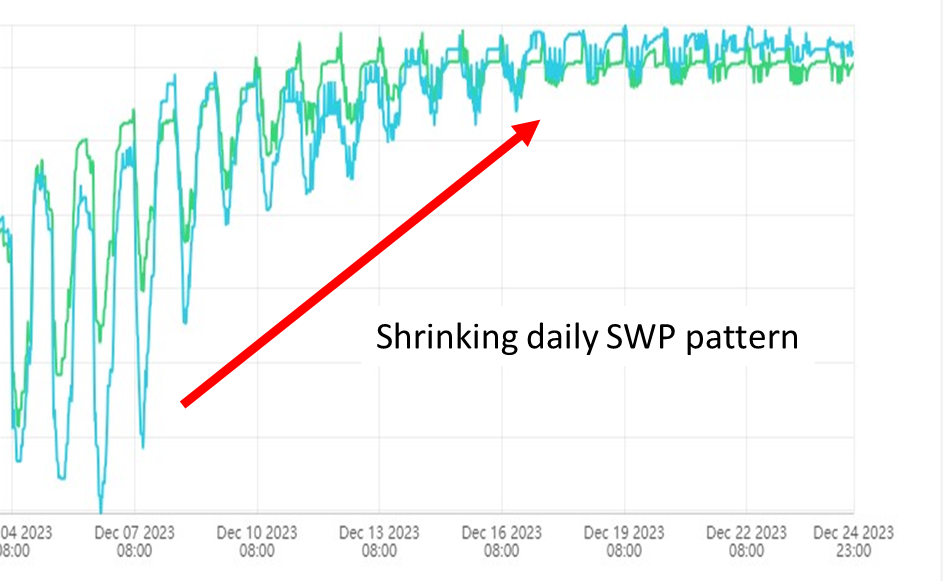
Sensor diurnal SWP fluctuations shrink. Difference between highest and lowest daily SWP become too small.
Problem:
- Sensor SWP readings show a shrinking diurnal pattern that may or may not go to zero.
Cause:
- Poor connection with xylem due to wounding response.
- Poor connection with xylem because installation wound closed over time.
Solution:
- This behavior may be due to the specific crop (i.e. walnut does this every time). Try re-installing and seeing if it happens again.
- Sensor may also be installed in ‘dying’ area of xylem. Reinstall in a different site.
- This behavior is normal and not a problem during the winter when the tree stops transpiring.
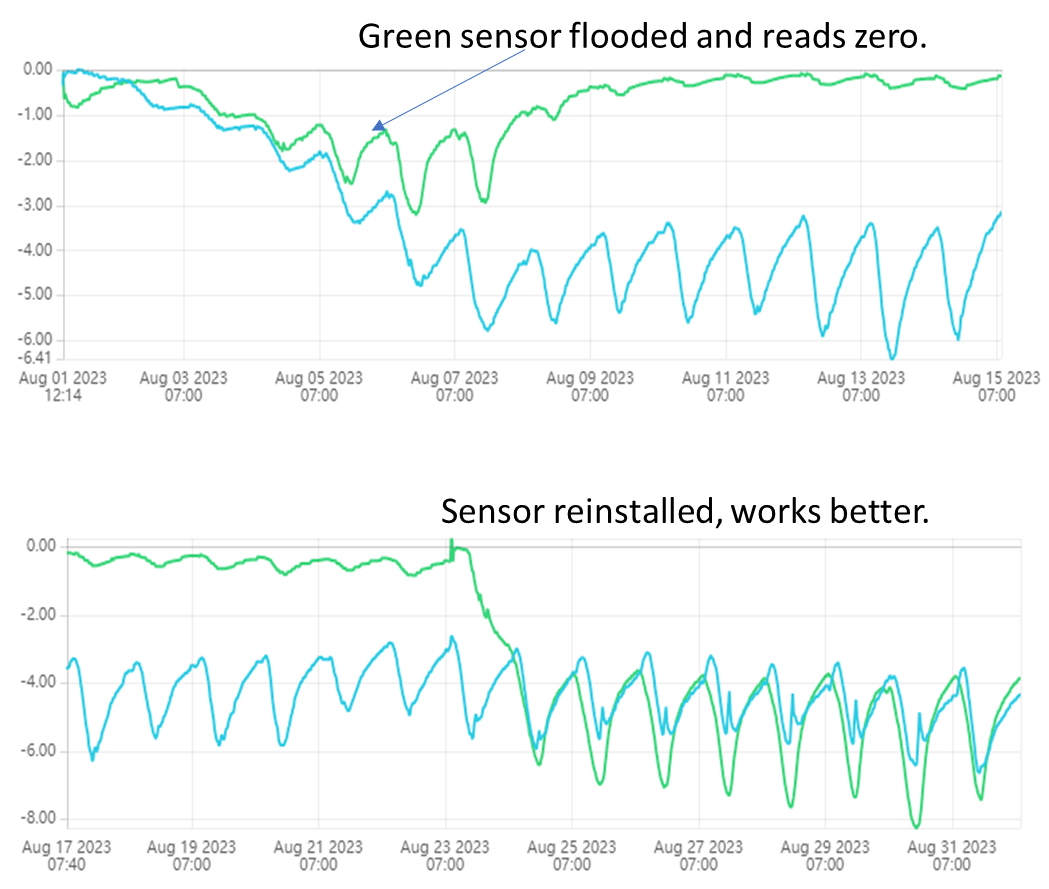
Sensor slowly goes to zero and stays there. Flooded.
Problem:
- The sensor slowly goes to zero and stays there.
Cause:
- Wounding response is blocking sensor.
- Sensor installed in ‘dead zone’ of xylem.
Solution:
- Try re-installing sensor.
- Some crops flood sensor immediately and cannot be measured for long: pecan, walnut and avocado.
- Some crops flood sensor randomly: pistachio, some citrus.
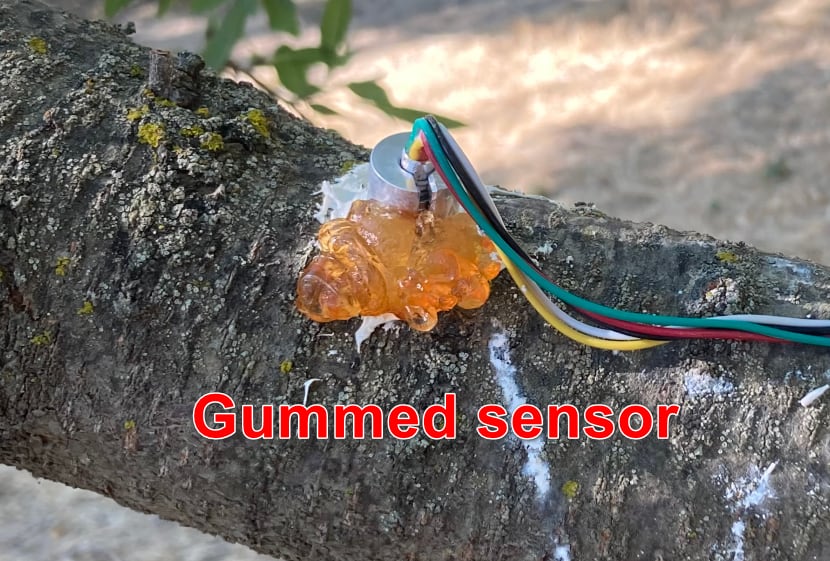
- Almond/prunus gumming can sometimes get into the sensor installation site.
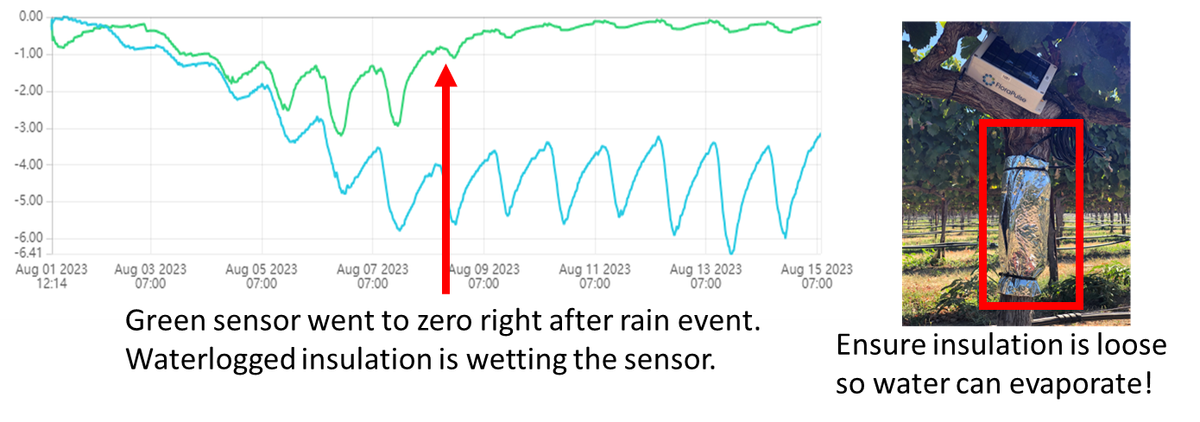
Sensor goes to zero right after a rain event. Waterlogged insulation causes sensor to read too wet.
Problem:
- Sensor displays similar behavior to sensor flooding. The sensor goes to zero and stays there, but this happens right after a rain/wetting event. It can also happen when there is morning dew.
Cause:
- Water stuck inside the insulation is wetting the trunk for multiple days and getting to the sensor install site. This external water causes the sensor to read too wet.
Solution:
- The sensor bubble wrap insulation should be attached somewhat loosely so that excess moisture can evaporate. This is especially important in wet climates.
- You might need to ignore SWP data right after a big rain storm, until excess water dries out.
- New small probe is less affected by outside rain due to use of better sealant.
Unrealistically dry readings during the hottest parts of the day, or quick drops in SWP during temperature increases (i.e. 10am). Psychometric.
Problem:
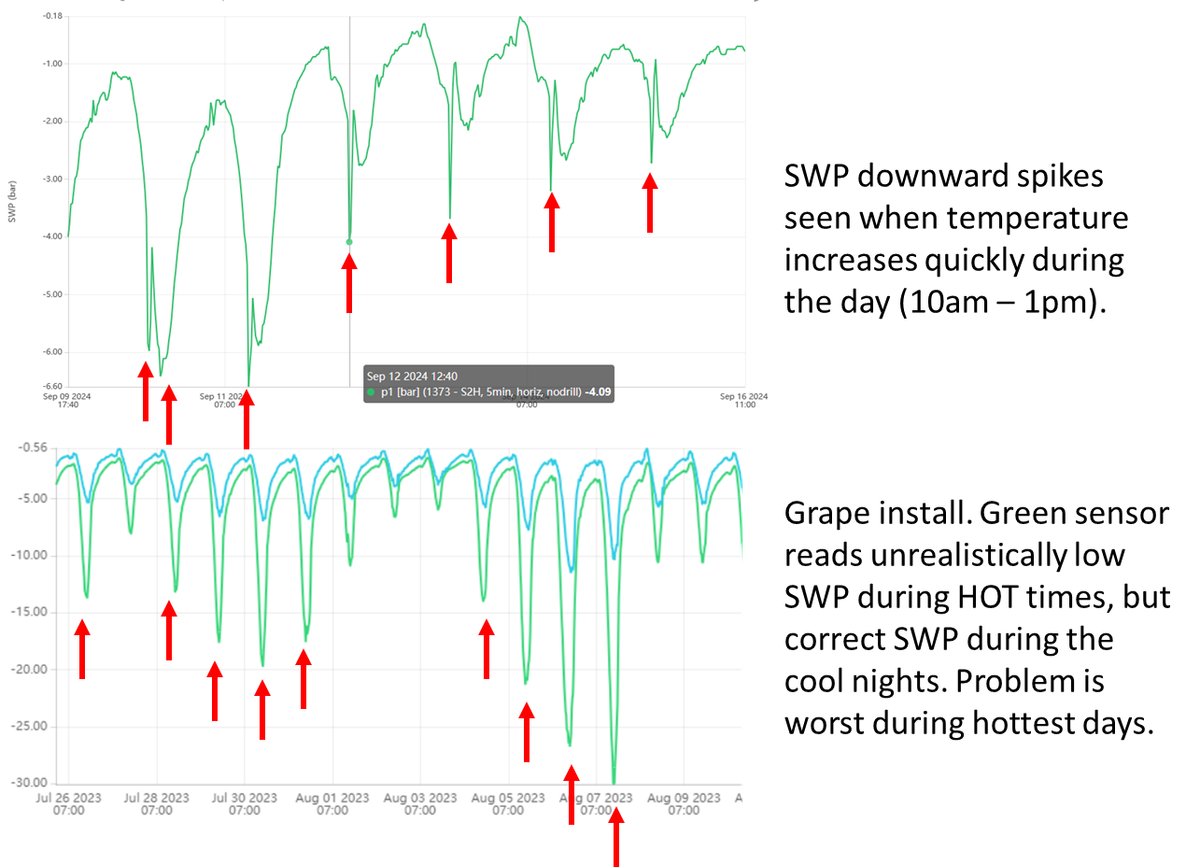
- Reading WP is extremely difficult because tiny temperature differences cause huge errors. This is usually not a problem with FloraPulse, except when there’s an air gap between sensor and xylem. For accurate measurement, there needs to be a continuous water path between the sensor and xylem.
- In the field, this shows up as reasonable SWP values when temperature isn’t changing much (at night), but very negative SWP measurements during the midday. The problem is worst during the hottest days.
- We call these spikes a 'psychometric effect' because they are caused by differences in temperature when the sensor-xylem hydraulic connection is poor.
Cause:
- Random air bubbles in the mating compound.
- Lots of cavitation in the mating compound due to very high, sustained heat and dry SWP.
- Break in the mating compound because the sensor was moved/hit, or subjected to vibrations.
- Installation into cavitated xylem vessels. This can happen if the install site is left to dry before sensor installation, or due to the specifics of your crop’s xylem.
Solution:
- It’s exceedingly difficult to diagnose exactly why this problem happens in a particular installation.
- Adding a big amount of air-tight insulation may help. But extra insulation is bulky and can absorb water during rain events (or condensation) and create the opposite problem.
- Usually it’s best to reinstall the sensor – this should fix the problem.
Sensor reads positive values over 1 bar
Problem:
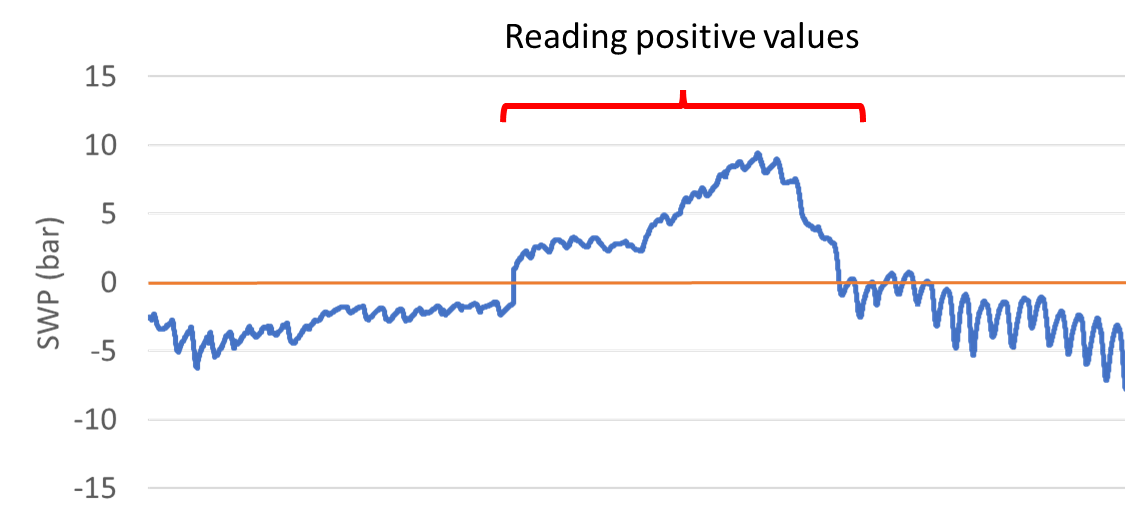
- Sensor reads unrealistically positive values, often happens right after a rain event.
Cause:
- Pressure on the chip can cause it to read positive values temporarily. This often happens right after a rain event when the xylem expands with water and presses on the chip.
Solution:
- Recommend ignoring the data if it is temporary. Otherwise remove and reinstall the sensor. You may also test the sensor in the lab to ensure it reads zero in water.
- Some species produce xylem exudates that press on the sensor and impede accurate measurement. If you consistently get positive readings in a particular species, the microtensiometer may just be incompatible and you’ll need to use a different method to measure SWP.
The lowest SWP for the day is delayed and happens at nighttime (i.e. 2 am)
Problem:
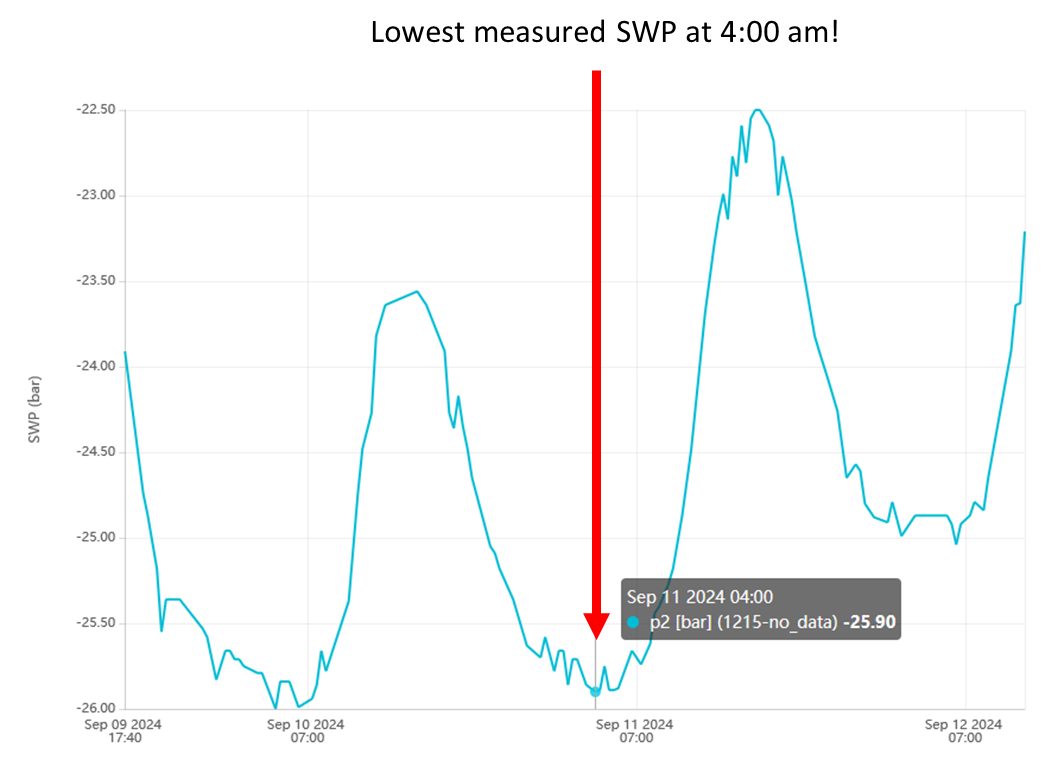
- Measured SWP usually reads lowest during the hottest part of the day, around 2 – 6 pm. But in this particular installation, the sensors read lowest anywhere between 8 pm to 8 am. This does not make sense.
- Usually this problem happens gradually. The sensors initially reach minimum SWP at 3 pm, but over time this time shifts to 6 pm, the 9 pm, and eventually 2 am.
Cause:
- We are currently not sure exactly why this delay happens, but believe it to be related to the wounding response. When osmolyte-full wounding gels make contact with the installation site, this generally happens. The physics of how and why this happens are unclear.
Solution:
- Sensors with a delayed response should be removed and reinstalled. This usually fixes the issue.
- The new small sensors are less likely to have this issue because of the way they are installed. The new installation method uses a better sealant to prevent wounding exudate infiltration into the install site.
Random upward spikes/noise
Problem:
- Sensors sometimes show random ‘upward’ spikes in the reading.
Cause:
- It’s unclear what causes this, but it may be due to the tree pressing on the sensor and stressing the chip.
Solution:
- Recommend just ignoring them.
- The new smaller probe may be less susceptible because the probe sits completely inside the sleeve and isn’t pressed on by the tree.
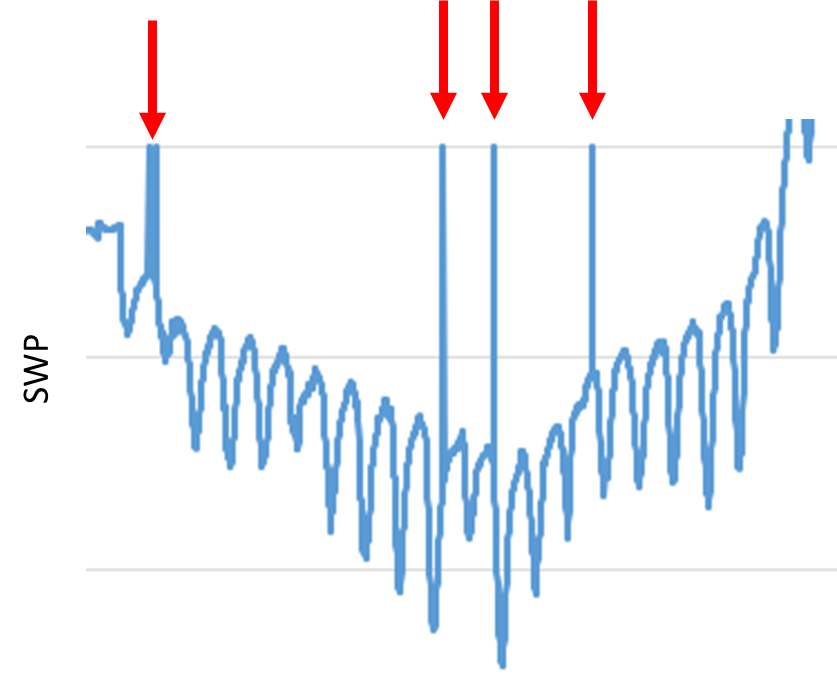
SWP data suddenly jumps to unrealistic value, or shows big 5+ bar amounts of noise. Sensor breaks.
Problem:
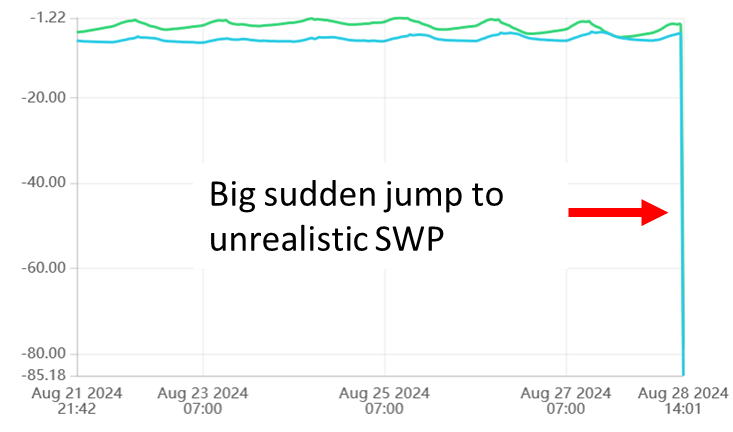
- Measured SWP suddenly jumps to an unrealistic value, or show big 5+ bar noise.
- SDI12 interface: measured voltage will usually go to +31.25 mV or -31.25 mV
- Analog sensors: measured voltage will go to a very high/low value.
Cause:
- It’s usually obvious when a sensor outright breaks. The data will have a huge jump in SWP and become noisy.
- The sensor may break due to mechanical damage to the wires from rodents, other critters or machines.
- It may also break due to excess pressure on the chip, usually due to a strong wound response. When this happens, the tree fills the installation site with gels and increases the pressure inside the installation sleeve. The increased pressure can move the chip and break the solder joints that attach it to the measurement wires.
Solution:
- Unfortunately sensors cannot be repaired because the parts are so small. A sensor replacement is needed. If the sensor is under warranty, we will replace it!
- Please be careful when testing our sensors in new species, as the wounding response may break them. We recommend testing 1 or 2 sensors to start, to avoid the frustration of breaking many sensors right away.
- Tie up wires to the tree after installation to keep them away from the path of humans or machines.
Over-winter behavior
Problem:
- Many crops go dormant during the winter and the measured water potential will go to zero, or show some ‘noise’ near zero.
- Measured water potential may go slightly above zero (+1 or +2 bars max).
Cause:
- This is normal and expected behavior. Trees will usually measure zero during dormancy.
Solution:
- Data during dormancy is not particularly useful and may be dominated by noise. We recommend ignoring data during winter, and not placing much emphasis on patterns seen during this time.
- We recommend sensors be removed and re-installed after winter for best accuracy. Depending on the crop, the installation wound closes during the winter, and if the sensors are not re-installed, they will read overly-wet values.
Slightly positive SWP values
Problem:
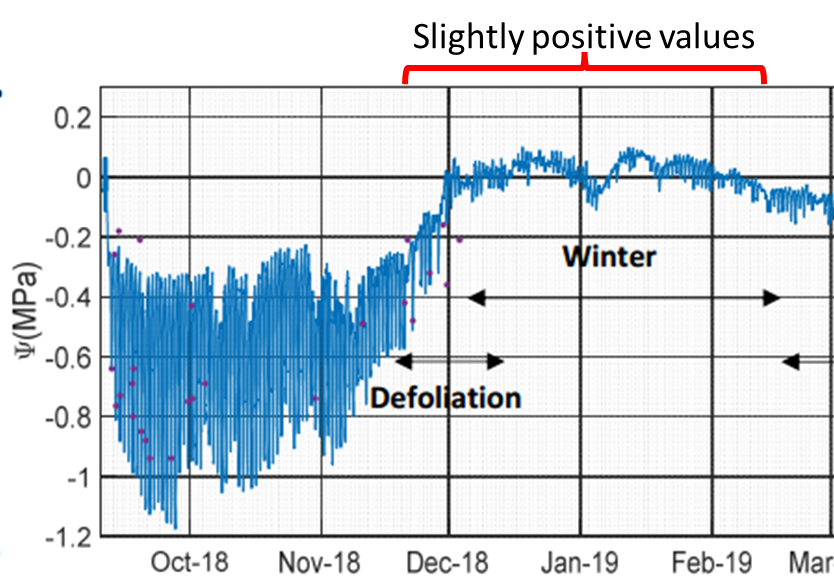
- Sensors read values slightly above zero.
Cause:
- Electrical noise (sensor inaccuracy).
- In some crops, there is actually positive pressure in the xylem at times (i.e. grape during leaf out) and the sensor is reading this.
- The solutes from the tree xylem/elsewhere got into the sensor water and cause readings above zero due to osmotic pressure.
Solution:
- Sensor readings slightly above zero are often normal. Sensors may read up to +1 bar positive pressure during normal operation.
- If in doubt, you may remove the sensor and reinstall it to see if the behavior changes.
- You may test the sensor in the lab. The sensor should read zero in pure water.
Below zero temperatures
Problem:
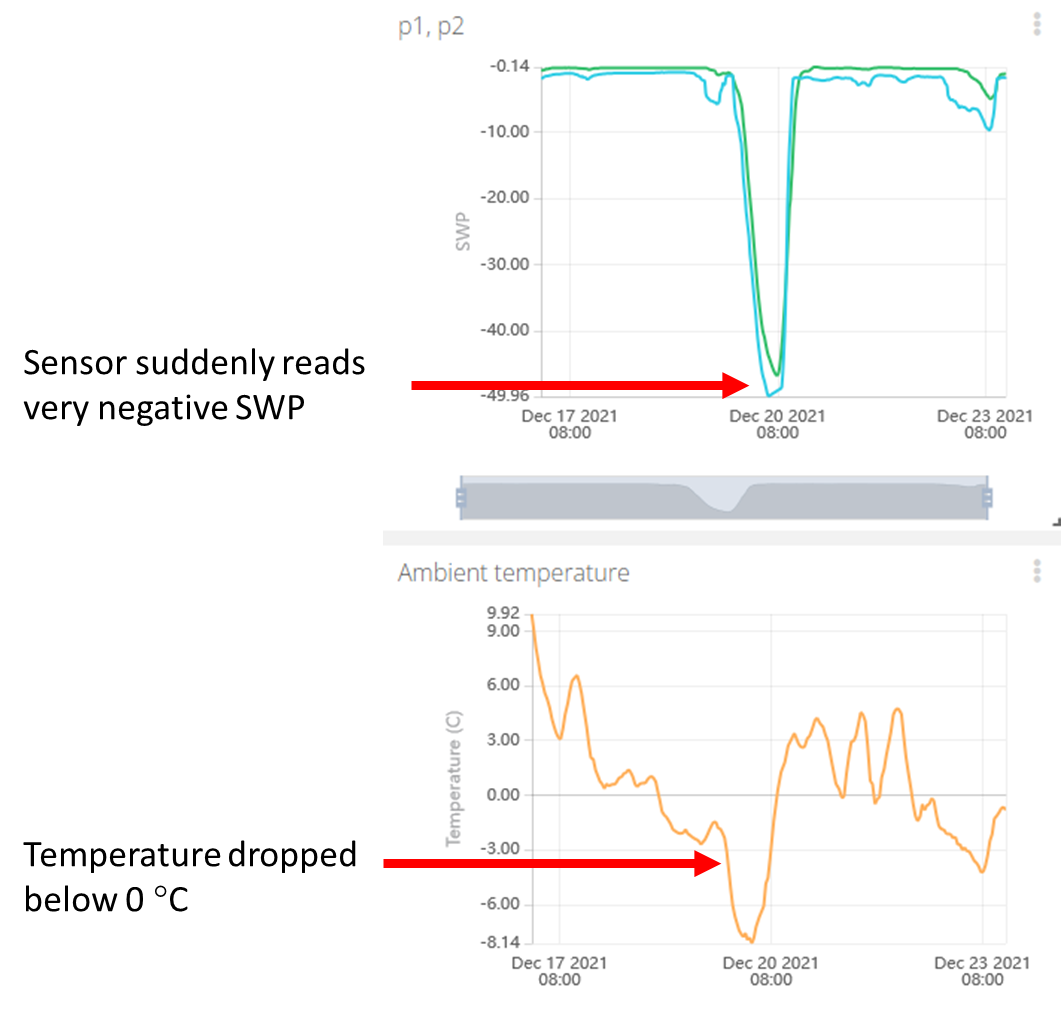
- Sensor suddenly reads very negative SWP when temperature drops below 0 °C.
Cause:
- Sensors will behave erratically when exposed to temperatures below freezing. Specifically, at temperatures below 0 °C the water inside the installation site will freeze and the water potential of ice is lower than that of water. The measurement will be inaccurate.
Solution:
- Sensors exposed to temperature below 0 °C will behave erratically and if the temperature is low enough (usually -5 °C) the sensor can freeze and break.
- If exposure is brief, the sensor may work properly afterwards. Longer exposure or colder temperatures will eventually freeze the probe and break it.
- Recommend removing the sensors during winter in places that routinely go below 0 °C. to avoid breakage.
If desired: test the sensor function in the laboratory!
If you are unsure how well a sensor is performing in the field, you can perform a series of tests in the laboratory to thoroughly check the sensor function. These tests are accurate and provide useful information, but they require (1) time, (2) measuring hardware, and (3) a skilled operator. Growers should generally never have to perform these tests! But scientists may find them useful, particularly when trying to reuse a FloraPulse probe multiple seasons. Here’s a link to the manual that goes over this testing.
Data-gathering problems
Data is choppy or completely missing (FloraPulse Datalogger)
Problem:
- Choppy or missing data from FloraPulse datalogger.
Diagnostics:
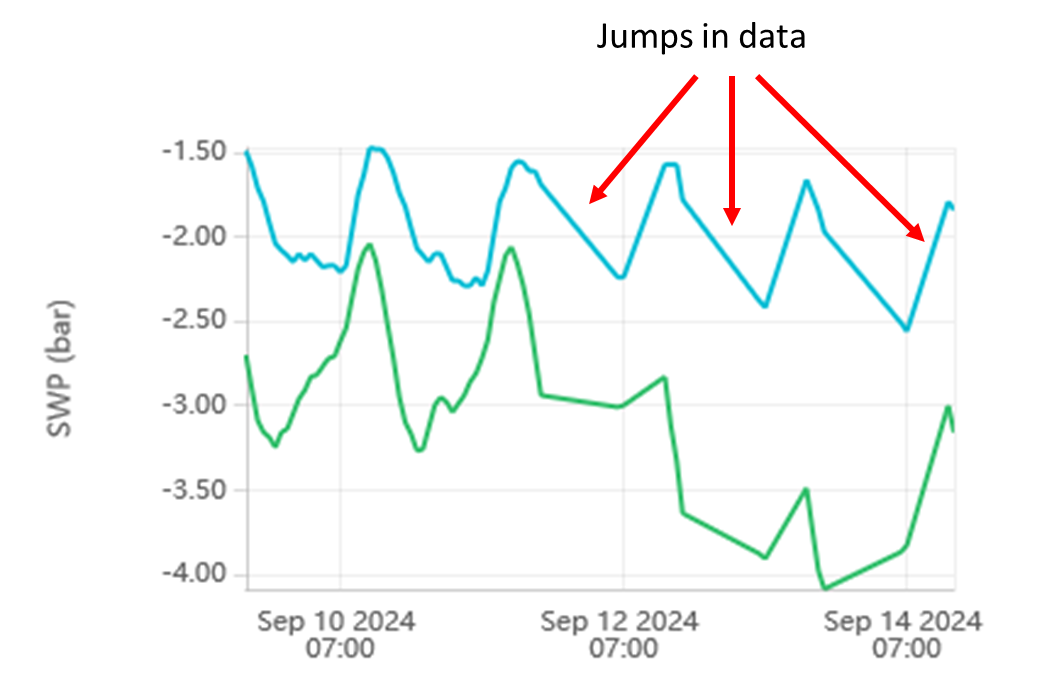
- If data is missing, it’s usually due to the datalogger (not the sensors). There are three main causes: low battery, poor cellular signal, and broken hardware.
- This video goes over testing the various functions of the datalogger, including testing for signal and battery.
Cause:
- Low battery: the dataloggers upload less frequently to save power. There are data gaps.
- Poor cellular reception: the dataloggers keep trying and failing to upload due to a problem with cellular reception. There are data gaps.
- No data: If there is zero data, the datalogger itself may also be broken due to physical damage or water damage.
Solutions:
- Low battery: ensure the solar panel faces up and gets enough sunlight. If this doesn’t fix the issue, then you may need to replace the battery, or (unlikely) the solar panel.
- Battery voltage should be greater than 3.6 V for adequate function.
- The solar panel wires should output a voltage greater than 5V when in sunlight. The ‘charging’ LED should turn on in the datalogger PCB.
- Older versions of our solar panels tend to yellow over time and lose efficiency – this could be the culprit – we can sell you an improved panel with more longevity.
- SD card – our older logger versions sometimes drain the battery because of a bug in writing to the SD card. Remove the SD card if the battery is draining too quickly.
- Poor cellular reception: this problem can be difficult to solve. You can try a few things.
- Add an external antenna to the datalogger SMA port to increase reception. This requires opening the datalogger and re-wiring the antenna that goes to the cellular modem. FloraPulse sells antennas, or you can buy your own.
- Changing the SIM card provider. You may get better reception by using a different SIM card provider. This requires ordering new SIMs, installing them, and changing the APN inside the datalogger menu. Unfortunately, some fields will not get good signal no matter what.
- Keep in mind that FloraPulse dataloggers use the ‘Cat-M’ cellular bands. These are different from the 5G your phone uses. This means that, although your phone may work in your field, our loggers may or may not (but they usually will).
- Ensure the correct antenna cable is connected to the cellular modem. The logger can use the internal antenna (a rectangle stuck to the interior of the box) or an external antenna (connected to the external SMA port). If using the internal antenna, the internal antenna needs to be connected to the cellular module u.FL port directly. If using an external antenna, the antenna needs to be connected to the outside SMA port, and the wire from this port needs to be connected to the modem’s u.FL port. The logger will obviously not find any signal if the antenna is misconnected.
- Broken logger: open the logger to look for obvious damage. Water damage should never happen and is covered under warranty. Physical damage due to shaking is not covered.
- Look at all the wiring inside the logger to ensure all wires are connected in their proper ports.
- Ensure the battery holder is firmly attached. In loggers that are mistakenly shaken, the battery holder will often come loose and prevent proper function.
If you still need help with your logger:
- Contact us and we’ll help you figure it out. The data below will help tremendously!
- Try connecting to the datalogger with the USB cable and uploading points directly – send us a screenshot of what goes wrong.
- Send us a picture of the datalogger insides.
Data shows ‘NaN’ (SDI12 interface)
Problem:
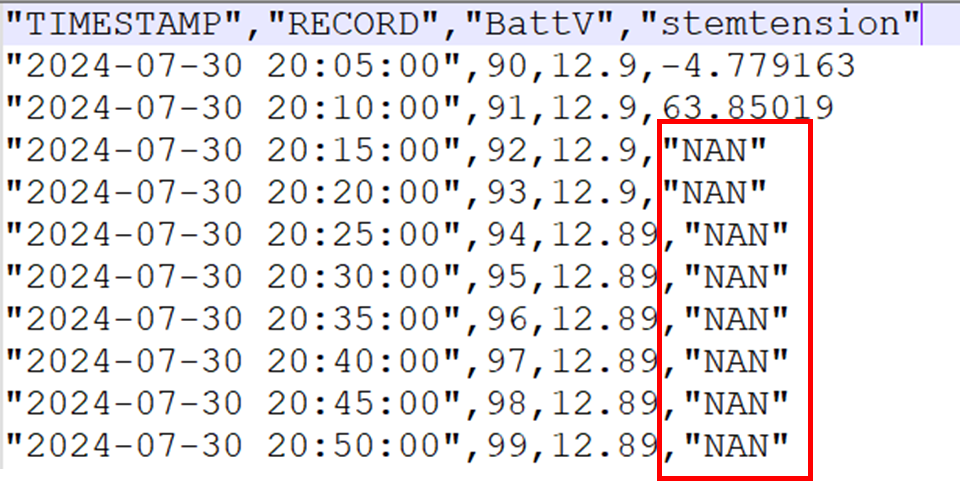
- SDI12 FloraPulse sensors show ‘NaN’ (not a number) sporadically or continuously.
Cause:
- ‘NaN’ means that your datalogger was unable to receive data from the FloraPulse SDI12 box. The SDI12 protocol is unfortunately delicate and can fail for a number of reasons.
- The FloraPulse SDI12 boxes fully comply with the SDI12 protocol, are extremely reliable, and are usually not the problem.
- Specific reasons for SDI12 failure:
- The SDI12 wiring may have become loose.
- Another SDI12 sensor connected to the same channel is malfunctioning and interfering.
- Two sensors have the same SDI12 address and are interfering with each other.
- The datalogger is polling the SDI12 box far too fast (several reads per second) and isn’t giving enough time in between measurements. Polling once per second is fine — the box only fails when hammered much faster than that. For typical field measurements FloraPulse recommends measuring every 20 minutes, since tree SWP changes slowly — not because the box cannot be read faster.
- Incorrect programming of the datalogger that gathers the SDI12 data.
- Averaging SDI12 data in the logger erases good readings whenever there is a ‘NaN’ in the averaged period.
Solution:
- Sporadic missing ‘NaN’ data in SDI12 communications can happen for unknown reasons. If you are only missing a few values per day, consider just filtering out the NaNs and using the rest of the data. No need to fix it if it isn’t broken!
- We recommend disconnecting the SDI12 box and testing it separately to ensure it’s working correctly. Then, one by one, add other peripherals to the same datalogger/SDI12 channel.
- Do not average SDI12 data.
- There are many excellent online guides on troubleshooting SDI12 sensors. Contact your datalogger manufacturer.
If you are still having problems with your SDI12 sensor:
- Contact us and we’ll help you figure it out.
- Send us a picture of your wiring and datalogger program (if relevant).
- Send us a screenshot of the data and what goes wrong when.