
uTensiometer SDI-12 Probe Manual
720 Olive Dr Ste E
Davis CA, 95616
(530) 220-7668
About
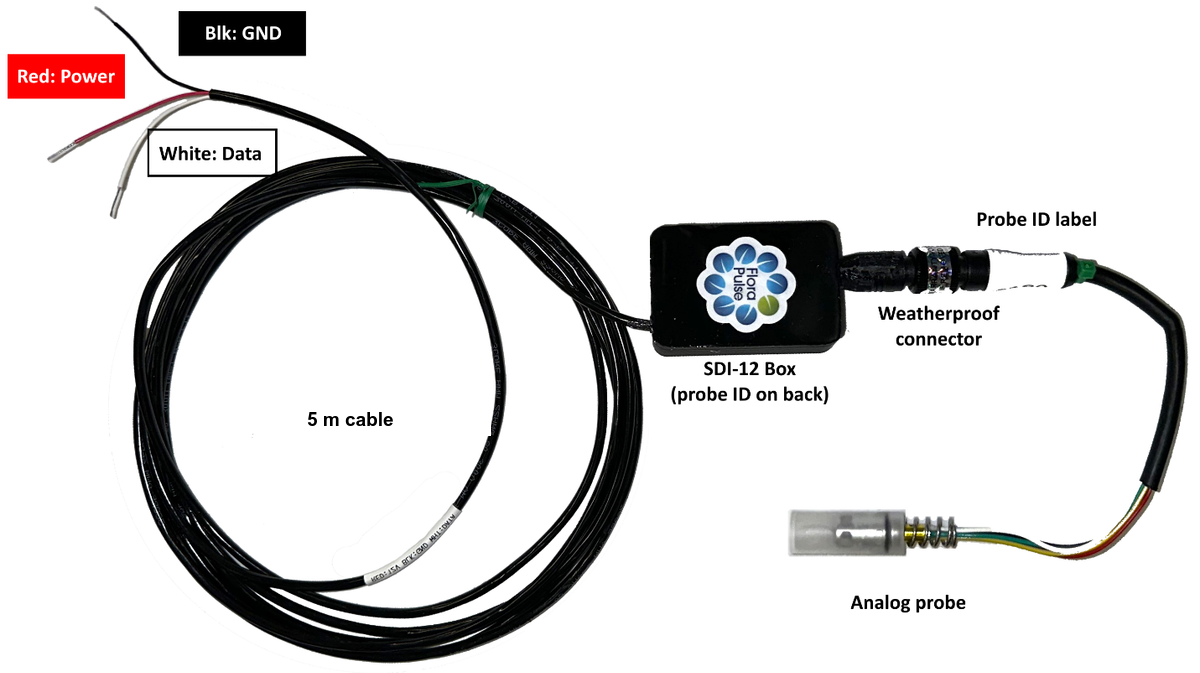
The uTensiometer SDI-12 probe directly measures the tree water potential. It consists of one analog probe and one “SDI-12 converter box”. The analog probe is about 6” long and connects to the SDI-12 box through a twist-on waterproof connector (no analog extension cable is used or needed in this configuration). The SDI-12 box powers and reads the sensor, then transmits the information using the digital SDI-12 protocol. The SDI-12 box contains the calibration coefficients for the analog probe attached, but can be re-programmed using custom SDI-12 commands for a different probe (instructions below). The SDI-12 box is waterproof and comes with a 5 m cable.
Connecting to a logger
The SDI-12 wiring is as follows: power wire (RED – connect to 3.6 V to 16 V), ground wire (BLACK – connect to GND), and data wire (WHITE – connect to DATA).
Communications
The uTensiometer uses version 1.4 of the SDI-12 protocol. The sensor is addressable through the full range of the protocol and is set to the default address 0. Multiple SDI-12 boxes can be read through the same port if configured with different addresses.
The sensor provides stem water potential of a plant in units of bars as the first number output. The second number is a direct reading of the sensor in mV/V and the third number is the resistance of the probe thermometer in ohms. Communication commands are described below through an example probe with address ‘0’, later changed to address ‘4’.
SDI-12 communication examples
Query the address of a sensor
sent:      ?!          (? !)
response:  0           (address)
Sending “?!” to a sensor that is alone on the SDI-12 bus will query the address. The sensor responds with the default address of 0 as the current address.
Change the address of the sensor
sent:      0A4!        (current_address A new_address !)
response:  4           (address)
Sending “0A4!” instructs the sensor at address 0 to change its address to 4. The sensor responds with its new address of 4.
Identify the sensor
sent:      4I!                          (address I !)
response:  414FLORAPLS0000011.1alpha1   (sensor_ID)
Sending “4I!” to the sensor’s new address will request the sensor to identify itself. The sensor responds with its current address (4), SDI-12 version (14), company name (FLORAPLS), sensor model number (000001), sensor version (1.1), and probe name (alpha1).
Start measurement and send data
sent:      4M!                  (address M !)
response:  40023                (address time(s) number_of_values)
sent:      4D0!                 (address D0 !)
response:  4-20.78-3.73+1269    (address+SWP+mV/V+resistance(ohm))
With checksum:
sent:      4MC!                        (address MC !)
response:  40023                       (address time(s) number_of_values)
sent:      4D0!                        (address D0 !)
response:  4-20.78-3.73+1269.26GC’     (address+SWP+mV/V+resist checksum)
Sending “4M!” requests the sensor to begin taking a measurement. The sensor immediately responds with its address (4), 3 digits detailing in seconds (002) when the measurement will be ready, and 1 digit for the number of values (3).
Sending “4D0!” after 2 seconds causes the sensor to respond with its address (4), the stem water potential in bars (-20.78), the direct reading of the sensor in mV/V (-3.73) and the resistance of the onboard thermometer in ohms (1269.26).
Sending “4MC!” requests the sensor to begin taking a measurement and to calculate a checksum. The response is the same as with “4M!”. When “4D0!” is sent after 2 seconds, the response includes the previous data (address+SWP+mV/V+resistance), plus a 3-character checksum (GC’).
Get internal sensor temperature (not all probes have this!)
sent:      4M1!           (address M1 !)
response:  40022          (address time(s) number_of_values)
sent:      4D0!           (address D0 !)
response:  4-3.78+25.58   (address + SWP (bar) + Temperature (°C))
This feature is experimental and only available on some sensors. These specific sensors have an internal calibrated thermometer that gives the temperature of the sensor. This calibration is not accurate, but can give you a sense of the overall temperature fluctuations in your system. Use the command “AM1!” to get back the sensor SWP and temperature.
Reading several boxes on one logger port – set the addresses before you deploy
Every SDI-12 box leaves the factory at address 0. Two boxes with the same address on one port answer at the same time and the logger records NaN for both, so give each box its own address before wiring them together – one box at a time, on the bench, before the boxes go to the field. A box keeps its address through power cycles.
Step 1 – Connect ONE box to the logger (red to 12V, black to G, white to a control port such as C1) and open a terminal to it. On a Campbell logger use SDI-12 transparent mode: in Device Configuration Utility (or LoggerNet Connect) open the Terminal tab, press Enter until the logger prompt appears (CR1000X>, CR6> …), type SDI12 and press Enter, then type the number of the control port the box is wired to (1 for C1). “Entering SDI12 Terminal” means you are talking to the box. Campbell’s short video: campbellsci.com/videos/sdi12-sensors-transparent-mode
Step 2 – Type ?! and press Enter. The box answers with its current address: 0 for a new box.
Step 3 – Type 0A1! and press Enter (current address, A, new address). The box answers 1, its new address. Addresses 0–9, a–z and A–Z are all valid; use 0, 1, 2 … in order, and keep FloraPulse boxes on the lowest addresses if third-party sensors will share the port.
Step 4 – Type 1I! and press Enter. The box answers with its identification string, which confirms it now listens at address 1. Write the address on the box or its cable (a strip of tape works) so it survives the trip to the field.
Step 5 – Disconnect that box, connect the next one, and repeat with the next address (0A2!, 0A3! …). Never have two unaddressed boxes on the port at once: ?! and 0A2! reach every box listening at 0, and both would change address together.
Step 6 – Wire all the boxes to the port in parallel (every red to power, every black to ground, every white to the same control port) and read each address in the logger program. The CR6 and CR1000X SDI-12 examples in the Campbell program pack (the download link at the end of this manual) read six boxes at addresses 0 to 5 on one port. The address can also be set from a running CRBasic program with SDI12Recorder(Result, C1, "0", "A1!", 1, 0), or from the FloraPulse calibration-upload page (app.florapulse.com/calibration-upload, with the USB uploader), which has a Set Address button.
Custom commands to switch out uTensiometers
Each FloraPulse probe requires 5 calibration coefficients to calculate SWP from the output voltage and resistance. These coefficients are stored in the SDI-12 box memory at the factory. Thus, every SDI-12 box is paired with a specific sensor.
It is possible to switch the microtensiometer paired for a specific SDI-12 box by uploading new calibration coefficients. The SDI-12 boxes are thus reusable with different probes.
Equations
Temperature (T, in °C) depends on the resistance (R, in ohms):
Pressure (P, in bars) depends on the voltage (V, in mV/V) and calculated temperature (T, in °C):
Probe coefficients
| Coefficient | Example value |
|---|---|
| mP | -3.9 |
| mPT | -0.00103 |
| bPT | 1.6709 |
| mT | 0.50061 |
| bT | -568.2353 |
| probe name | gamma3 |
List of commands for each value
| SDI-12 command | Coefficient to set |
|---|---|
| XB | mP |
| XC | mPT |
| XD | bPT |
| XE | mT |
| XF | bT |
| XH | probe name |
Each SDI-12 command sets a unique calibration value. The current address precedes the command. We recommend changing the calibrations with only a single SDI-12 box attached to the same port because the current address can be queried.
Changing mP, bPT and the probe name
sent:      4XB-3.9!      (address XB new_mP_coefficient !)
response:  4-3.9         (address new_mP_coefficient)
sent:      4XD+1.6709!   (address XD new_bPT_coefficient !)
response:  4+1.6709      (address new_bPT_coefficient)
sent:      4XHgamma3!    (address XH new_probe_name !)
response:  4gamma3       (address new_probe_name)
After querying the address, sending “4XB-3.9!” instructs the probe to memorize the mP value as -3.9. The probe responds with the address and the memorized value. The bPT and probe name are shown for a positive number and a word. All values will need to be updated to provide an accurate pressure measurement.
Typical sensor readings
Here is an explanation of what sensor readings should look like.
- Stem water potential: +0.5 to -35 bar. Typical sensor readings should be between completely wet (~0 bar, maybe slightly positive due to noise) and the lowest water potential for your crop (down to -35 bars, lower values can damage the sensor). If the sensor reads very positive or negative values (i.e. +30 bars or -125 bars), then either (1) the sensor calibrations are incorrect, or (2) the sensor is broken and needs replacement. Sensor calibrations will always be incorrect if a sensor is attached to an incorrect SDI-12 converter box – each box contains calibration factors for 1 specific sensor (indicated by the sticker on the box). When the sensors are placed in water, the reading should be close to zero SWP, and the voltage should be stable (fluctuating very little).
- Voltage: -31.25 mV to +31.25 mV. This is the range of the ADC. If the probe reading is stuck at either end (±31.25 mV), this likely means the probe broke and needs to be replaced.
- Resistance: Some of our sensors include an internal thermometer, used mainly during manufacture. The thermometer is uncalibrated and inaccurate, but helps us test sensor function. Thermometer resistance is usually around 1,000 – 3,000 Ω. If the sensor lacks this thermometer, the interface will indicate -9,999 Ω. Many sensors do not have this thermometer and this is completely normal. Thermometer resistance is unnecessary for normal sensor readings.
Tips for reading (and troubleshooting) SDI-12 sensors in the field reliably
- Use only FloraPulse sensors on the same SDI-12 port. Mixing different sensor types can cause crosstalk and communication interference.
- If you must read FloraPulse and third-party sensors in the same SDI-12 channel, give FloraPulse sensors the lowest SDI-12 addresses (0, 1, 2…). This configuration minimizes communication conflicts with third party sensors.
- Add 1-2 second delays between commands. Insufficient delays between sending measure and read commands can prevent the logger from receiving complete responses. Try adding a 1-2 second delay between SDI-12 commands (read and measure) if necessary.
- Do not poll the sensors faster than about once per second. A measurement takes about 200 ms, so a 1-second polling interval works, and anything slower (5 seconds, 1 minute, 20 minutes) is comfortably safe. Only much faster polling — several reads per second — overruns the SDI-12 communication and returns 'NaN'. Reading every 1-5 seconds is fine for a bench test or a dry-down test.
- In the field, take measurements every 5 to 20 minutes. This is not a limit of the box. Tree SWP changes slowly, so faster polling adds no information and only costs power. You want data at least every 20 minutes even if some measurements fail.
- Save the raw data and do not average measurements. The SDI-12 protocol will sometimes fail to send data, and thus you may get NaN for some percentage of the readings. This is normally not a problem, since you can ignore the NaNs. But if your logger tries to average multiple readings, then as little as 1 NaN will cause your averaged reading to be NaN, effectively deleting all data for that period.
- Ignore a small number of NaNs in your dataset. Occasional communication failures are normal with the SDI-12 protocol and won't affect overall data quality.
Updating the box firmware
Boxes shipped from October 2026 accept new firmware through their own sensor wires, so a sealed box stays up to date for life. Open app.florapulse.com/sdi12-updater in Chrome or Edge, disconnect the box from its logger, clip the SDI-12 uploader to the box's wires colour to colour (red to red, white to white, black to black), and click Connect & check. The page names the box and the firmware it will receive; click Start update. It sends the firmware, checks it end to end, reports CONFIRMED after 12 to 15 minutes and plays a chime; the box keeps its serial number and calibration, and then goes back on its logger. The page also updates the uploader's own firmware first when it is out of date.
Specifications
Wiring
- Power: RED
- Ground: BLACK
- Data: WHITE
Electrical specifications
- Power input: 3.6 V to 16 V
- Current drain: 0.65 mA (sleep), 12 mA (measurement)
- Measurement duration: 200 ms (typical)
Measurement specifications
- Water potential
- Resolution: 0.1 bar
- Accuracy: ±5% of reading
Physical specifications
- Probe length: 6”
- Cable length: 5 m
- Extended cable lengths are available.
- Connector type: IP67 waterproof
Sample datalogger programs
You can download example programs to read FloraPulse analog and SDI-12 sensors with Campbell Scientific dataloggers at this link.